
• Skip to primary navigation
  • Skip to main content
  • Skip to footer
Have an Emergency? Get Help Now
Shoreline Technology Solutions in Holland, MI

Shoreline Technology Solutions

Shoreline Technology Solutions

  • About
    • Testimonials
    • Blog
  • Services
    • Managed Services
      • Essential
      • Advanced Security
      • Compliance-as-a-Service
    • Co-Managed Services
    • Hardware Services
    • Cloud-Based Solutions
    • Disaster Recovery as a Service
    • VoIP (Internet Phone) Services
    • Free Network Assessment
  • Case Studies
  • Submit Ticket
  • Remote Assistance
  • Contact
  • Free Assessment

Set up the Outlook App on your iOS Device

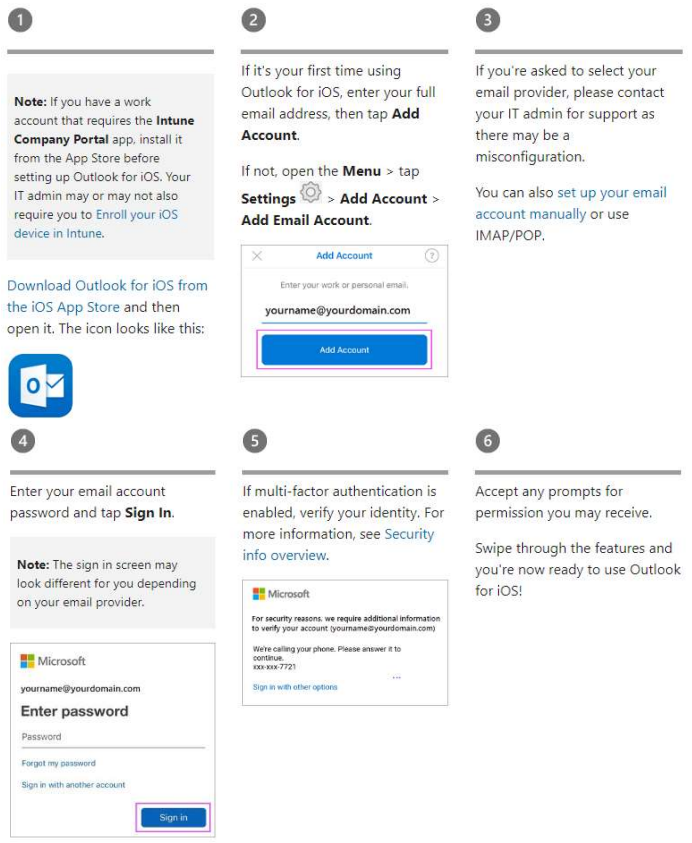
To set up the Outlook app on your iOS device, follow these step-by-step instructions:

Note: If you have a work account that requires the Intune Company Portal app, install it from the App Store before setting up Outlook for iOS. Your IT admin may or may not also require you to Enroll your iOS device in Intune.

  1. Download Outlook for iOS from the iOS App Store and then open it.
  2. If it’s your first time using Outlook for iOS, enter your full email address, then tap Add Account. If not, open the Menu > tap Settings > Add Account > Add Email Account.
  3. If you’re asked to select your email provider, please contact your IT admin for support as there may be a misconfiguration. You can also set up your email account manually or use IMAP/POP.
  4. Enter your email account password and tap Sign In.
  5. If multi-factor authentication is enabled, verify your identity. For more information, see Security info overview.
  6. Accept any prompts for permission you may receive. Swipe through the features and you’re now ready to use Outlook for iOS!
How to Set up the Outlook App on your iOS Device

If you are having trouble, we are happy to help! Put in a help ticket by emailing help@stsmich.com or call the office at (616) 394-1303.


Download these instructions as a PDF

Guard Your Business Against Ransomware!

Get the Guide

Footer

Contact

Shoreline Technology Solutions
828 Lincoln Ave.
Holland, MI 49423
Phone: (616) 394-1303

Message Us

Services

  • Services Overview
  • Managed Services
  • Co-Managed Services
  • Hardware Services
  • Cloud-Based Solutions
  • Free Network Security Assessment
  • Disaster Recovery as a Service

For Clients & Prospects

  • Testimonials
  • Blog
  • Client Knowledge Center
  • Submit Ticket
  • Remote Assistance
  • Payment Portal

Follow Us

  • Facebook
  • LinkedIn

Sitemap | Website Design by OptimWise